How Diffraction Is Calculated
By Rob Shea, infrared photographer and author of Color Doesn’t Exist
What is diffraction?
Diffraction is a property of photographic systems that affects the sharpness of your images. At the highest ƒ-stop values of a camera lens, diffraction will cause softness in your photos. When seeking the sharpest image in visible light photography, you may wish to avoid a couple of stops of the highest ƒ-stop values on your lens. For example, if the maximum ƒ-stop number on your lens is ƒ/22, you might avoid ƒ/22 and ƒ/16, which will soften your image due to diffraction. In this example, an ƒ-stop value of ƒ/11 produces a sharp image without diffraction.
In infrared photography, the impact of diffraction is more significant. With the same lens, you might also avoid using ƒ/11 and ƒ/8. The sharpest ƒ-stop could be ƒ/5.6. You can see how dramatically diffraction impacts the settings you choose. This can be limiting, or it can be used for creative effect.
Excerpt from my book, Color Doesn’t Exist: A Practical Guide to Infrared Photography
Certain wavelengths of light are transmitted through an infrared filter. That light passes through a lens aperture at a given ƒ-stop, producing an Airy Disk of a specific size on the sensor. We then compare the Airy Disk size to the pixel pitch of the sensor to calculate the diffraction ratio.
Diffraction Ratio
What is the diffraction ratio?
The diffraction ratio compares two measurements:
- Airy disk diameter produced by a particular specific wavelength of light passing through a specific lens aperture
- Camera sensor’s pixel pitch
Here is the formula:
\[\text{Diffraction Ratio} = \frac{\text{Airy Disk Diameter (nm)}} {\text{Pixel Pitch }(\mu\text{m}) \times 1000}\]A diffraction ratio of 3 or lower will not result in visible diffraction. A diffraction ratio above 3 and below 4.5 results in mild visible diffraction. A diffraction ratio of 4.5 or higher will visibly impact image sharpness.
The diffraction ratio values were compared with visual diffraction tests for APS-C and medium format sensors to determine values where visual diffraction appears.
How are the Safe, Caution, and Avoid ƒ-stops chosen?
The calculator turns these thresholds into three ƒ-stops for your camera and filter, each calculated to the one-third stop:
- Safe is the highest ƒ-number with a diffraction ratio of 3 or lower at every wavelength the filter passes, so there is no visible diffraction.
- Caution is the highest ƒ-number with a diffraction ratio of 3.75 or lower at every wavelength the filter passes. 3.75 is the midpoint of the 3 to 4.5 mild-diffraction band, so the softening is still slight, well short of the 4.5 point where it clearly shows.
- Avoid is the lowest ƒ-number where any wavelength the filter passes reaches a diffraction ratio of 4.5, where diffraction visibly impacts image sharpness.
Why diffraction ratio of 3 or lower?
Each sensor pixel contains the luminance information for a single color channel: red, green, or blue. To calculate the full RGB color of each pixel, the values of adjacent pixels are sampled. This process is called demosaicing.
Since a pixel and its adjacent pixels are sampled to determine its color, an Airy disk three pixels wide will not cause diffraction. An Airy disk larger than three pixels wide can cause diffraction. In testing diffraction on both Bayer and X-Trans sensors, the diffraction ratio produces similar results regardless of demosaicing type.
Warning: I have not tested Sigma cameras to validate that a Diffraction Ratio of 3 is the right threshold. Sigma Foveon sensors use stacked color sensors and do not use the same demosaicing as Bayer or X-Trans sensors.
Airy Disk
What is an Airy Disk?
All photons coming from a single point on your subject do not produce a single point of light on your camera’s sensor. Due to diffraction, each photon bends in a slightly different direction when passing through the aperture. Photons strike the sensor in a disk shape, surrounded by concentric light rings. This disk is called an Airy disk.
Excerpt from my book, Color Doesn’t Exist: A Practical Guide to Infrared Photography
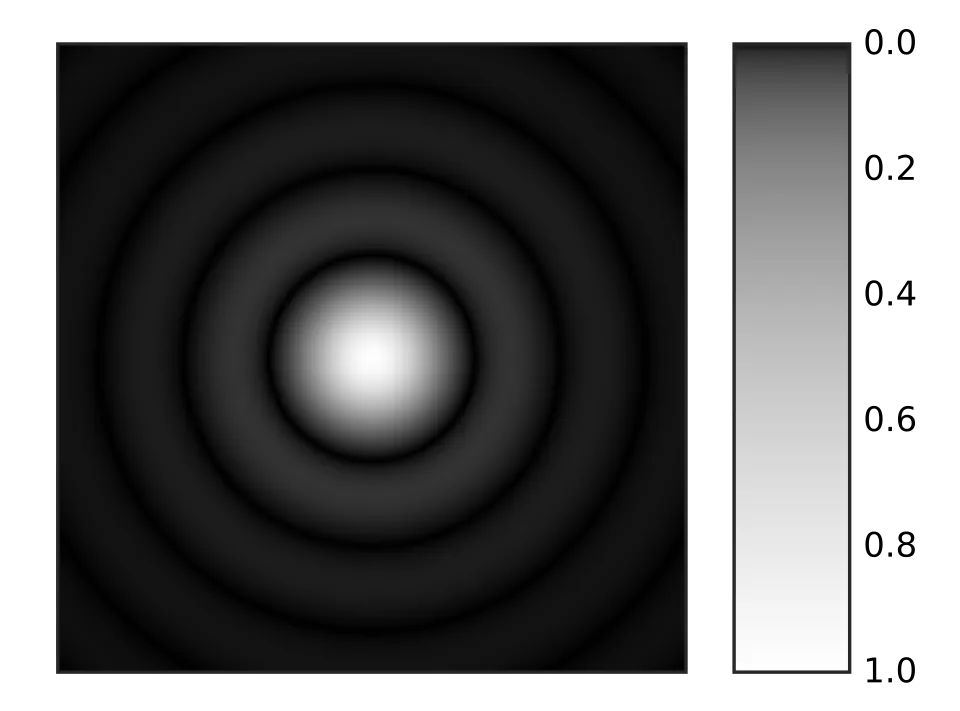 Image credit: Sakurambo (public domain)

How do you calculate Airy disk size?
This formula is used to calculate the radius of an Airy disk.
\[r_1 = 1.22λN\]\({\displaystyle r_1}\) is the radius of the Airy disk from the center to the first null. The first null is the gap between the central dot and the first ring. Double the radius to get the diameter of the Airy disk from null to null. This diameter is measured in nanometers (nm).
λ (lambda) is the wavelength of the light, measured in nanometers (nm).
N is the ƒ-number or ƒ-stop of the imaging optics. ƒ-number is a ratio of the focal length in millimeters (mm) divided by the aperture diameter in millimeters (mm).
An easier to read version of this formula would be:
\[\text{Airy Disk Diameter (nm)} = 2.44 \times \text{Wavelength (nm)} \times \text{ƒ-number}\]Does focal length impact diffraction?
Focal length is used to calculate ƒ-number. ƒ-number is a ratio of the focal length divided by the aperture diameter. The formula for the Airy disk diameter could also be written as:
\[\text{Airy Disk Diameter (nm)} = 2.44 \times \text{Wavelength (nm)} \times \left(\frac{\text{Focal Length (mm)}}{\text{Aperture Diameter (mm)}}\right)\]Pixel Pitch
How is pixel pitch calculated?
Camera specifications provide the exact sensor width in millimeters (mm) and horizontal pixel count. We can use these values to estimate pixel pitch in microns (μm) with this formula.
\[\text{Pixel Pitch }(\mu\text{m}) = \frac{\text{Sensor Width (mm)} \times 1000}{\text{Horizontal Pixel Count}}\]Why compare to pixel pitch?
Pixel pitch is the measurement from the center of a pixel to the center of an adjacent pixel. Pixel pitch is the best proxy we have for sensor pixel diameter, since sensor pixels are rectangular and their sizes are typically not published.
Wavelength is measured in nanometers (nm). This results in the Airy disk size being measured in nanometers. Pixel pitch is measured in microns (μm). Pixel pitch values are multiplied by 1,000 to convert from microns (μm) to nanometers (nm).
Who made this calculator?
I’m Rob Shea, an infrared photographer and the author of Color Doesn’t Exist: A Practical Guide to Infrared Photography. I built diffraction.cam to show which ƒ-stops stay sharp for a given camera and filter. The diffraction ratio thresholds come from my own diffraction tests on APS-C and medium format sensors.
You can find more of my infrared photography on my blog and my YouTube channel.
Additional Reading
Airy disk
Demosaicing
Diffraction-limited system
Foveon X3 Sensor